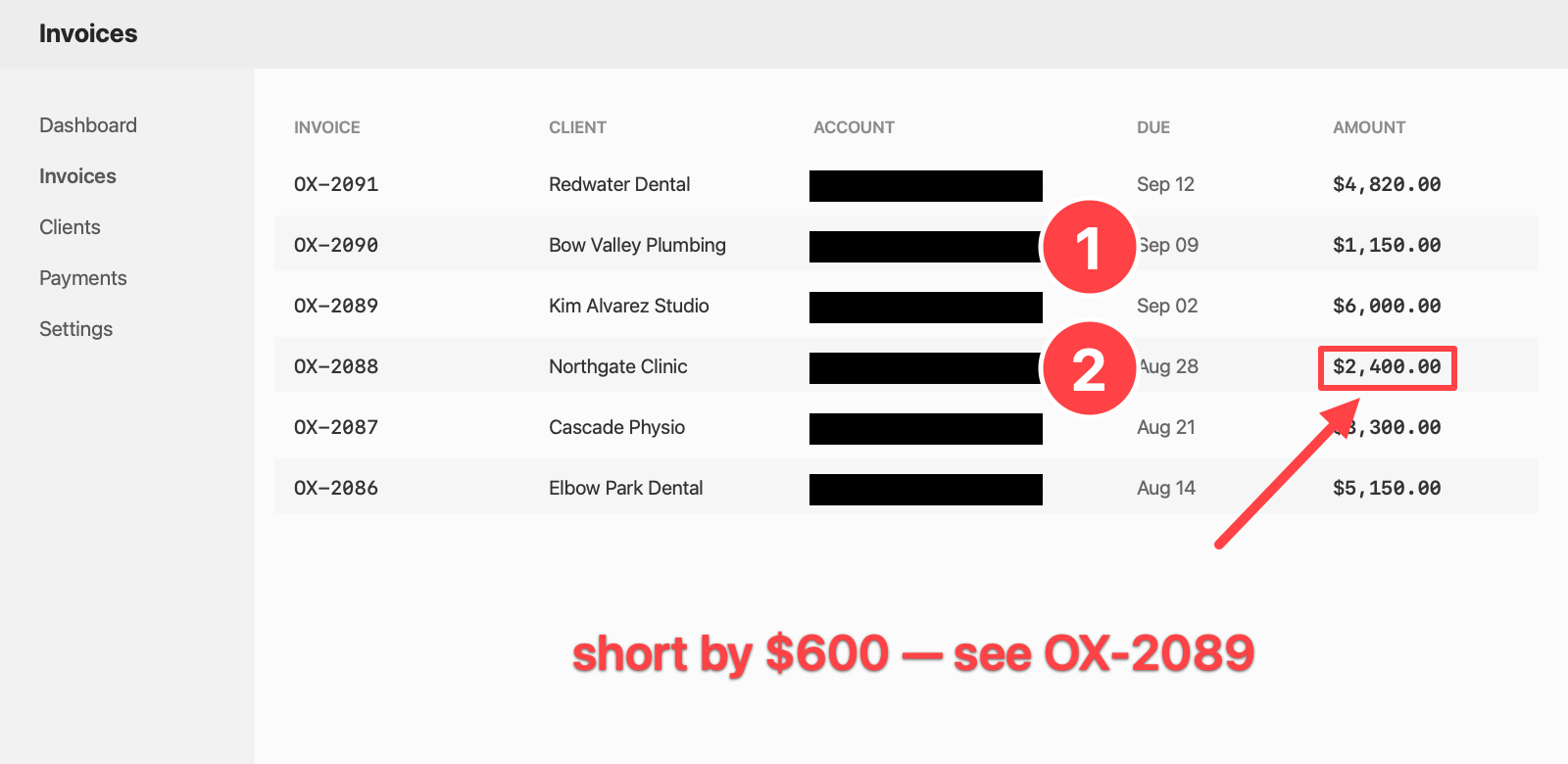
Capture an area, a window, or the whole screen. Every shot is copied to your clipboard and saved to your screenshots folder without a window opening. When one needs marking up, the confirmation is the way in.
Arrows, boxes, ellipses, freehand, text, highlighter, numbered steps and crop — plus the three ways of hiding something, which are not equally good. Digits pick a tool, ⌘Z undoes anything including the crop, and ⌘-drag pulls the finished PNG straight into Slack or a Finder window.
Made with Snap. Every account number here is blacked out, not blurred — and the invoice data is invented.
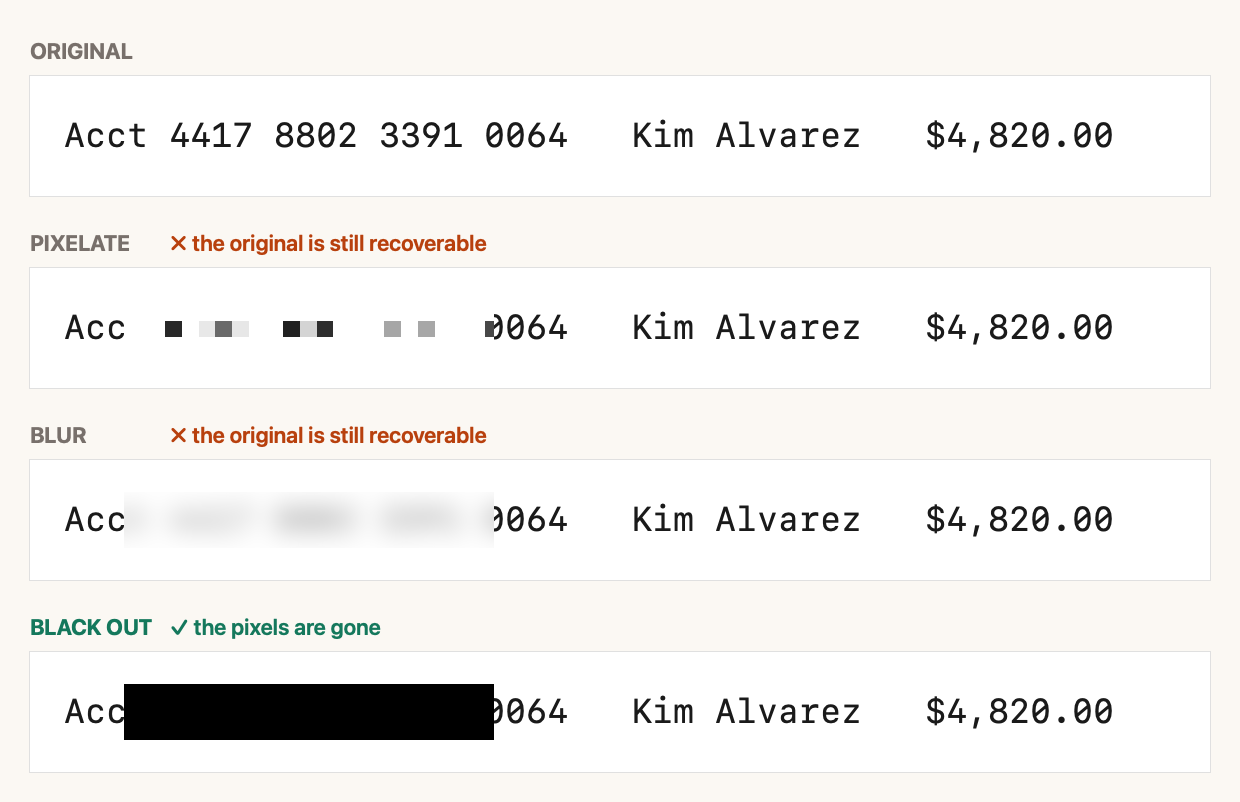
Pixelation and blur are transformations of the original pixels, not deletions of them. The information is still in the file, attenuated — and for screen text, which is a known font at a known size, that is often enough to reconstruct what was underneath. Published tools recover pixelated text. Blur is harder and not safe either.
So Snap ships a Black out tool alongside the other two, and it is the one to use for anything that actually matters: an account number, a client name, a key, an address. It paints over the pixels, and the export is flattened, so nothing of the original survives it.
One thing this changes about the workflow: because a capture is saved the moment you take it, blacking something out afterwards would normally leave the unredacted original sitting in your folder. It doesn’t. Saving from the editor replaces the file the capture already wrote, rather than adding a second one beside it.
Drag a box, or just click a window to take that window. A loupe shows real pixels with the hex under the cursor. Space moves the selection, arrows nudge it one pixel.
The display the pointer is on — which on a two-monitor desk is the same as “the main one” only by accident.
Drag over anything — a PDF, a screenshot someone sent you, a video still — and the text lands on your clipboard. English and 中文, read on-device.
Magnify to the pixel, click, and the hex is on your clipboard. Read from the frozen screen, so what you see is what you get.
Not ⇧⌘3/4/5: macOS owns those, and a global shortcut that collides with a system one registers happily and then never fires. All four are re-recordable in Settings.
The moment you press the key, every display is captured — and what you then drag a box over is a still picture, not the live desktop.
That is why an open menu, a hover state or a tooltip is still there four seconds later while you are lining the crop up, and why the loupe and the eyedropper can show you the exact bytes that will be saved.
Apple’s text recognition takes a list of languages, and the list is ordered — it treats the first entry as the primary script rather than as one hint among several.
With English first, a line of Chinese comes back as mojibake or is dropped entirely. Snap
leads with zh-Hans, which reads Chinese correctly and still reads English
exactly. Verified against mixed, English-only and Chinese-only text.
Not yet. If you screenshot long web pages or long chat threads all day, this is the one thing you will miss, and you should know that before you download it.
No video, no GIF. macOS’s own ⇧⌘5 does that well and Snap does not try to replace it.
No account, no cloud, no share links, no update check, no analytics. There is no networking code in the app at all — not switched off, not present.
No gradient backdrops, drop shadows or rounded-corner mockups. If you want a screenshot to look like a product launch, this is the wrong tool.
Because that permission is reading the screen — there is no narrower one to ask for. macOS will prompt the first time you capture. Nothing captured leaves your Mac; the app cannot send it anywhere, because it has no networking code.
To your clipboard and to your screenshots folder, both, on every capture. If you have
already told macOS to put its own screenshots somewhere other than the Desktop, Snap uses
that same folder rather than inventing a second one. Otherwise it uses
~/Pictures/Screenshots. Changeable in Settings.
It is free, and there is no upgrade to sell you. We built it for ourselves because the tool we were using stopped working on a new macOS and had not been updated in nine months. The catch, such as it is: an owner who uses it every day is reminded every day who built it. That is the whole business model.
Version 0.2.0 — genuinely new. It is signed and notarised by Apple, and the capture, editor, OCR and colour paths are each tested, but it has not had years of other people finding its edges. If something is wrong, tell us and it gets fixed rather than queued.
Snap is a Saturday’s work because the tooling was already there. The same hands build the booking, invoicing and admin systems Calgary businesses actually run on — custom, one-time, and yours to own.
Free, under a megabyte, and it never phones home.